Track every defect from report to review.
Manage defects after handover in one shared list. Homeowners submit a description, photos and a location on the floor plan. Your team sets deadlines, assigns repairs, checks completed work and decides when to close each case. Questions and replies stay in Messages.
Book a demoA defect that arrives by email has no number.
It has no location either, no owner of the next action, and no deadline anyone wrote down. Somebody copies it into a spreadsheet, somebody else phones a contractor, and the owner's second email about the same crack starts a second thread. Six weeks later the crack is fixed, or it is not, and either way the only record is the mailbox of whoever handled it.

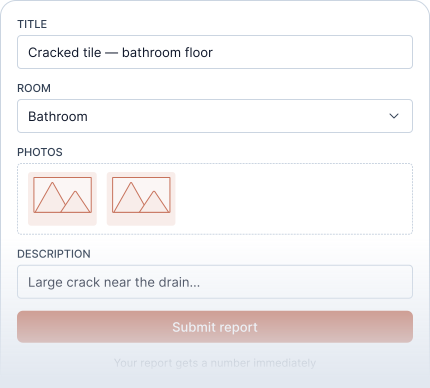
The details you need to assess a defect.
The owner gives a title, picks the room, taps the spot on the floor plan and adds photos from their phone. The report gets a number and appears in your queue with everything attached. If something is missing, ask for it from inside the record; the owner gets one email and the answer lands in the timeline.
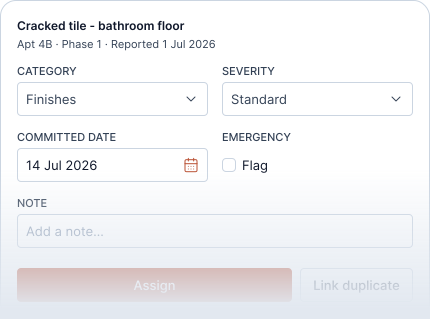
Your team decides urgency, deadline and route.
Set the deadline and the owner sees it. Choose the category and mark the severity; both stay internal. Flag an emergency and the case goes where your rules say, immediately. Link a second report of the same crack as a duplicate and do the work once. Write internal notes that never leave the team.
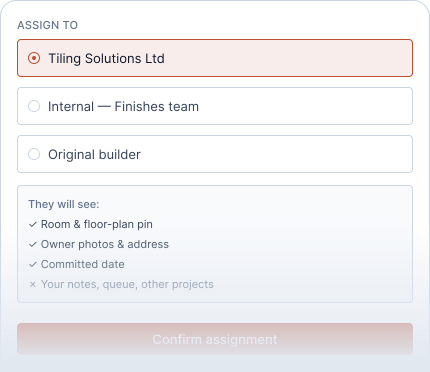
Assign repairs with clear instructions.
Assign the defect to an internal department or an external contractor. They see the room, floor-plan location, photos, address and deadline. Access is limited to assigned defects and conversations they are explicitly included in; your internal notes and full owner directory stay private.
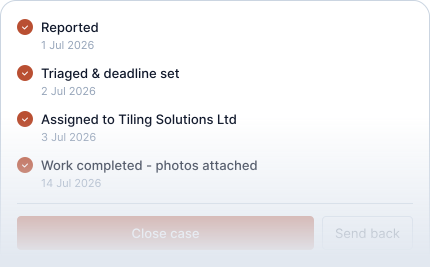
Done is a proposal. Closed is your decision.
The contractor attaches photos of the finished work and marks the job done. Your team checks it and closes the case, or sends it back with a reason the contractor can read. Cases that are late or contested show an escalated or disputed state instead of hiding in an inbox. A withdrawn report is cancelled with a reason and stays in the history.
Defects are work. Questions are conversation.
When an owner wants to ask about parking or a manual, they write in Messages, an ongoing conversation tied to their home. A conversation can point at a defect, but it never changes the defect's record, and a defect never turns into a thread. Your team routes both without copying anything between them.
What the owner sees.
- A progress timeline: Submitted, Registered, Under review, In progress, Resolution.
- The date your team committed to, or "your manager will set the date" until then.
- Email updates about relevant milestones, such as a deadline being set, a visit being agreed, a request for information or case closure.
- Never the category, the severity, your notes or the contractor's price.
Frequently asked questions
Can the owner set a priority or a date?
No. The owner describes what they see. Your team decides urgency and commits to the date the owner then sees.
Can a contractor close a case?
No. The contractor marks the work done and attaches the evidence. Only your team closes a case.
Can we use Toveta for pre-handover snagging?
Toveta is designed for aftercare once homes are handed over. You can import defects identified before handover and manage the follow-up in Toveta.
What if two homeowners report the same defect?
Link the second report to the first as a duplicate. The work is done once, and each owner keeps their own report and timeline.
Does it work on a phone?
Yes. Owners report from the browser on their phone, with photos straight from the camera.
See how Toveta would work for your team.
Choose a case you would like to discuss. In thirty minutes, we will show how Toveta supports the process, from the homeowner's report to your team's review and case closure.
Book a demo