Your home's documents, defects and messages in one place.
If your developer uses Toveta, they will invite you to your homeowner portal. Report a defect, add photos, follow progress and message their customer care team.
Have an invitation? Open the link in the email your developer sent you.
What you can do in your homeowner portal
Documents
Find handover documents, floor plans, manuals and warranty documents shared by your developer.
Defects
Report a defect and follow its progress. Each report has a number and shows the deadline once your developer sets it.
Messages
Ask your developer's team a question about your home. Conversations are kept separate from defect reports.
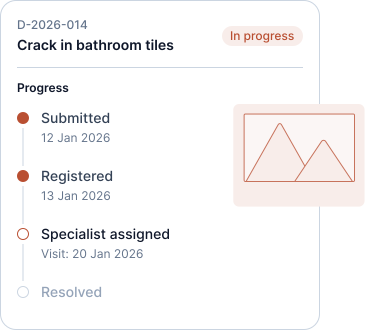
Report it once.
Add a title, describe what you see, mark the location on your floor plan and attach photos. Follow the report in the progress timeline: Submitted, Registered, Under review, In progress, Resolution. The final step shows the recorded outcome of the case.
When your developer sets a deadline, you will see it in the timeline. You receive email updates about relevant milestones, such as a visit being agreed or changed, a request for information or case closure.
Your developer reviews the report, decides the order of work and sets the deadline. You can then see that date in your timeline.
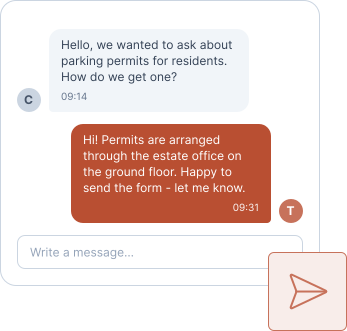
Ask without starting over.
Use Messages to ask your developer's team about your home, attach photos and return to earlier conversations. If a contractor needs to join, your developer adds them and you can see which parties are included. Access is limited to authorised staff and invited participants.
Things you canstop doing
Repeat the same details to each person involved.
Send the same photos again.
Call to ask whether anyone received it.
Remember another password. You sign in from a link sent to your email.
Wonder who is coming. When a visit is agreed, you are told.
One account for the homes you are invited to.
Use the same email for a flat, a parking space or a home from another developer using Toveta. Each has its own documents, defects and conversations. A developer's branded portal shows only homes managed by that developer.
Only yours
You see your property and nothing else. Neighbours cannot see your reports and you cannot see theirs. What appears in Documents is chosen by your developer. There is no public feed, no reviews page and no community wall.
Frequently asked questions
How do I access my homeowner portal?
Your developer must invite you first. Open the sign-in link in their email. If you have not received an invitation, ask their customer care team to check your email address and send it again.
Can I use my phone?
Yes. Toveta works in the browser on any phone, and you can add photos straight from the camera.
Can my partner sign in too?
Yes. Your developer can invite everyone who owns the home, each with their own email.
What happens to my access when I sell my home?
Tell your developer. They move the home to the new owner, and your access to it ends.
Does Toveta record when I reported a defect?
Yes. Your report is saved with a date and time in the history of your home, so you can refer back to what you reported and when.
See how Toveta would work for your team.
Choose a case you would like to discuss. In thirty minutes, we will show how Toveta supports the process, from the homeowner's report to your team's review and case closure.
Book a demo