Defect report template for your new home
Describe what you have noticed, show where it is and attach useful photos. This template gives your developer's customer care team a clear starting point for reviewing the report.
- Download PDF templatePDF · Print a blank report and complete it by hand.
- Download editable templateDOCX · Fill in the report in a document editor.
- View completed examplePDF · A fictional cracked tile report.
Give the team enough detail to find and assess it
Identify your home and the location
Include your home address or the reference your developer uses. Name the room and the exact spot. “Kitchen, floor tile beside the doorway” is easier to locate than “a cracked tile”.
Describe what you can see
Explain the observation in your own words and say when you first noticed it. If the date is uncertain, say so. You can record what you see without deciding its cause.
Add a view of the area and a closer photo
Use one photo to show the location within the room and another to show the detail. Give each file a clear name and refer to it in the report.
Include a way to contact you
Give the developer the contact details they need to reply. Keep a copy of the report and attachments you send, together with the date and any reference you receive.
Example: a cracked floor tile
The report describes the observation. The customer care team reviews it, asks for any missing information and decides the next action and deadline.
Cracked kitchen floor tile
- Report title
- Cracked kitchen floor tile
- Development
- Example development
- Home reference
- Apartment 12
- Room and location
- Kitchen, floor tile beside the doorway
- First noticed
- 14 September 2026
- Description
- A crack runs across the floor tile beside the kitchen doorway. I noticed it on 14 September 2026.
- Photos
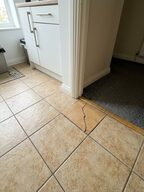
 A view of the kitchen doorway and a closer view of the crack
- Report date
- 14 September 2026
Send the report through your developer's channel
If your developer has a homeowner portal, use its reporting process. You can use the template to prepare the description and photos. Otherwise, follow the reporting instructions your developer provided.
Before you send
- Check that the home and location are clear.
- Attach the photos mentioned in the report.
- Keep a copy and any confirmation you receive.
- Use the existing reference when adding information.
Frequently asked questions
Should I put several defects in one report?
No. Use one report for each defect, so each one gets its own reference, next action and outcome.
Should I choose the urgency or a repair deadline?
No. Describe what you see. The customer care team reviews the report and sets the deadline.
Does this template confirm that work is covered by a warranty?
No. The template records what you observed. Your developer decides what happens next.
Can I submit the completed template on this page?
No. Send it through your developer's homeowner portal or the reporting channel they gave you.
See how Toveta would work for your team.
Choose a case you would like to discuss. In thirty minutes, we will show how Toveta supports the process, from the homeowner's report to your team's review and case closure.
Book a demo